If Any request contact us :techtanu17@gmail.com << Catch on Facebook << If any link broken, Plz tell. we try to fix them.
Showing posts with label TRICK. Show all posts

Monday, 15 July 2013

TRICK TO SPEED-UP YOUTUBE VIDEO BUFFERING


1.Increase your Internet speed by 20%:

This is a very old trick to speed up your internet connection.This trick increases your net speed by 20% which means you are increasing your youtube videos buffering speed as well.


Microsoft windows reserves 20% of your available badwith for their own purposes like updates and interrogating with your PC etc.

Important: If a bandwidth limit is set for a particular network adapter in the registry, this setting is ignored when configuring that network adapter.
Follow these steps to increase your internet connection speed by 20%:-

* Click on start, select run and type "gpedit.msc".

* select to LOCAL COMPUTER POLICY>COMPUTER CONFIGURATION>ADMNISTRATIVE TEMPELATES>NETWORK> QOS PACKET SHEDULER>LIMIT RESERVABLE BANDWITH.

* Double click on "limit reservable bandwith" and then select "enable" snd edit the bandwith to O.

Its a nice trick...!! try it and get internet speed 20% more..!!

Note:For some versions of windows like windows home and basic versions don't have gpedit.msc command,in that case just ignore this trick not a big deal and follow the below tricks.
2.Join Youtube Feather Beta:

This is a new Youtube Project called Youtube Feather Beta.
Go to Youtube Feather Beta[THIS LINK] and click on join youtube feather beta.Now search for videos and start watching,you should have already found the difference in speeds before and after.


Limitations:

In youtube feather beta you dont see many comments.
You will not be able to like or dislike the video.
You will get only 5 suggested or related videos.

The bandwidth which is used to load these things will be utilised to speed up the videos.If you dont like this version then you can leave youtube feather beta at any time.

3.Use Youtube DNS:


Using Youtube open DNS will help you in speed up the youtube video buffering.

For Windows XP users:


1. Go to Control Panel from the Start menu.

2. Click on Network Connections from the Control Panel choices.

3. Choose your connection from the Network Connections window.

4. Click Properties button.

5. Select Internet Protocol (TCP/IP) and click Properties.

6. Click the radio button Use the following DNS server addresses and type in OpenDNS addresses in the Preferred DNS server and Alternate DNS server fields.

208.67.222.222

208.67.220.220
For Windows 7 Users:

1.Go to control Panel.

2.Click on Network and Internet then click on Network and Sharing Center.

3.Click on Change adapter settings(at left side).

4.Right Click on Local Area Connection then select Properties button.

5.Double click on Internet Protocol version 4 (TCP/IPv4).

(dont change any thing in IP address)

6. Click the on Use the following DNS server addresses

and

type

Preferred DNS server: 208.67.222.222

and

Alternate DNS server: 208.67.220.220


Then click ok and its done!
4.Speed up youtube videos Buffering with SpeedBit Video Accelerator:


Not only for YouTube, the software works well with more then 165 video sites like Yahoo Video, Facebook, Aol Video, Myspace, ESPN, and many more . You just need to install the software and it will take care of the rest. The free version works with all the normal videos but for accelerating HD (High Definition) videos you need to upgrade to premium version.

SpeedBit Video Accelerator[Download from here]
5.Increase Youtube Buffering Speed by changing the Video Quality:

You can also speed up Youtube videos buffering by changing the quality of videos to low quality like 240p,360p etc.Use this when you have to do nothing with the quality of videos.

6.Get a Good Internet Plan with good Net Speed:

With the above tweaks you can speed up your youtube videos buffering more than thrice but if you really want a very good buffering then getting a good subscription plan with good net speed is a wise thing.


Hope that my Tips on Speeding us Youtube Videos Buffering helped you.Those who have tried leave your comment.If you have any more tricks then share us in your comments.

INCREASE UTORRENT DOWNLOAD SPEED IN FEW STEPS

Now, are You  ready for increase torrent Download speed
Hello guys, THis articles is shared from other site.

You can apply these Setting to uTorrent and BitTorrent.Most poeple use uTorrent thats why i choose uTorrent For this Tutorial to show how to change settings.But you can apply same settings to BitTorrent. Ok let's Start!!
  • Click on "Option"
  • Go to "Preferences"

Speed Up uTorrent, BitTorrent


  • Click on "Bandwidth"
Speed Up uTorrent, BitTorrent

  •  Set Maximum Upload Rate : ------------------------------- [ 10 ]  or  [ 15 ] Maximum Download Rate : ---------------------------- [ 1800  ] Global maximum number of connections : ------------- [ 2329 ] Maximum number of connected pees per torrent : ---- [ 100 ] or not more than [ 300 ] Maximum upload slots per torrent : -------------------- [ 14 ]                        
  • Leave rest Default

Speed Up uTorrent, BitTorrent

Now  final step
  • Click on "Advanced"
Speed Up uTorrent, BitTorrent

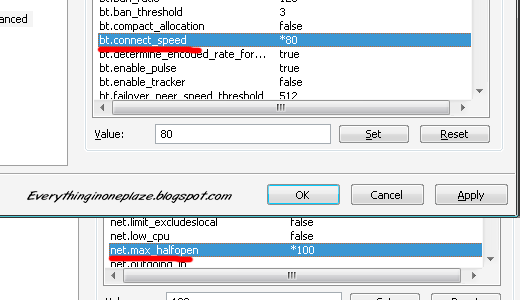
  • Look for "bt.connect_speed" Set it to "80"
  •  Look for "net.max_halfopen" Set it to "100"
    Now All DoNE!! Click on "Apply"
    Exit the uTorrent Application and re Run it.......Feel the new speed
    (Check out the screen shot below)


Speed Up uTorrent, BitTorrent


Before i use this trick my download speed was 200-250kbps.But Now ( not only this trick, I used step 3. and 4 mentioned above) !!! You can see that below :)
     
Click To Zoom
If Like Share it and Join us.
Enjoy high speed with torrent download
Thanks

Friday, 12 July 2013

SEARCH ENGINE REFINARY TRICK

we can make search more efficient by learning some basic knowledge of symbols.


Some of Symbols are: 


Use Of '+' Symbol :
Examples :

Search: reviews of +iPhone and iPod
This will show results containing the word reviews or iPod but the search results will defiantly consist of iPhone 


Use Of '-' symbol :
Using '-' sign before any word will ensure that particular word will not be included in the search results !


Use Of '~' sign :
Using '~' before any word will return the results also containing the synonyms of the word !
Define a word :

To get the definition of a word just use :
Write the following in google search engine.
For Eg : Search: define:Computer
This will return you results which define 'Computer'.


Find Pages similar to a page :
To find a page similar i.e. consisting of same type of content, use the following syntax :
Search: related:http://dotcomshare.blogspot.in/

Search for exact phrase :
To search a set of words exactly together i.e.
For Example :
Search: "contact us"
This will return the results containing both contact and us together !

Using the wild card '*' :
The * sign can be used in places where the whole word is not known.
For Example:
Search: friend*
This will return the results containing friend , friends , friendship.

Search for exact phrase :
To search a set of words exactly together i.e.
For Example :
Search: "about us"
This will return the results containing both about and us together !


Using the '?' sign :
This is used when the full spelling of the word is not known.
For Example:
Search: anti??s
This will result that in the results in which any alphabet can take the place of '?' sign.


Use of boolean operators :
The boolean operators like AND,OR,NOT can be used in search box to connect the words !
The search engine understands them as what they mean but the must be in capital letters !
For Example :
Search: antivirus OR idm
This will return the results containing either antivirus or idm.


Search a particular site :
Write the following code in google search engine.
For Example
Search: site:http://dotcomshare.blogspot.in/ antivirus
This search antivirus in dotcomshare blog only.


If like this post follow us, share it.

Thanks

DOUBLE DRIVER FULL VERSION FREE DOWNLOAD

Double Driver is a very simple and useful tool which not only allows you to view detailed information of all the drivers installed on your system but also allows you to backup, restore, save and print all chosen drivers.

 Requirement:
Operating system :: Microsoft Windows XP/Vista/7 (32-bit or 64-bit)

Features:

  • - List, save, and print drivers details
  • - Backup drivers from current Windows
  • - Backup drivers from non-live/non-booting Windows
  • - Backup drivers to structured folders, compressed (zipped) folder, and
  • self-extracting capability
  • - Restore drivers from previous backup
  • - Available in GUI and CLI application
  • - Portable (no installation required)
 License
Double Driver is FREEWARE. Read license.txt for more infomation about the license.

  Distribution Files:
  • - dd.exe :: GUI application
  • - ddc.exe :: CLI application
  • - dd.dll :: Application extension
  • - license.txt :: License information
  • - readme.txt :: This file
  • - whatsnew.txt :: Version history

 DOWNLOAD FILE FROM BELOW LINK

THANKS

Wednesday, 3 July 2013

HIDDEN FOLDER MAKER SOFTWARE FREE DOWNLOAD

 Hello friend's, today we learn, how to make hidden folder for security purpose.today i am using simple, small and easy trick. An beginner also easily use this one.


To hide important data from other user. So to stop unauthorized access of file is important today.
Here i Am giving a simple tick to hide data.
It is simple and no software Installation is require for it.


Just download below code.....................


And Paste this code in notepad...............

and save file secret.bat or any name in place of secret but .bat is important so place .bat after file name that u save.
now ur tast is over.

When u click on this file he ask enter password to unlock folder.
Now default password is tanisha. If  u wants to change it then edit code . search tanisha and replace it with ur own password
When u enter password hidden folder appear. and wrong password no folder appear.
when u wants to hidden this folder click on file and press y button.
Your folder are hidden now.

FOR MORE, JOIN FACEBOOK

DOWNLOAD TORRENT FILE WITH IDM FREE DOWNLOAD

Todya we learn how to download torrent file with the help of  internet download manager(IDM)

1.First [CLICK HERE]. 

2.Signup for a free account in Zbigz. 

3.After the signup process is finished go to your torrent search engine and search for the file which you want to download with IDM.
4.Then download the torrent file from your desired torrent.

5.Now go to Zbigz.com[CLICK HERE].

6.There hit on upload and chose the torrent file which you have downloaded previously then hit Go.

7.After you hit go your torrent file will be downloaded by high speed servers and your file will be ready to download(If its a large file then wait for few minutes).

8.When you hit download button then a box will pop up asking the type of download which you want either free or premium.Go for free download.

9.That's it your download will be ready and you can download torrent files with idm.

Now Enjoy torrent file downloading with IDM.

Other website that is similar to www.zbigz.com is www.Torrific.com try  this also.

if You have not IDM then download latest idm from below link

DOWNLOAD LATEST IDM FREE WITH KEYGEN
FOR MORE, JOIN FACEBOOK

GET SERIAL NUMBER THATS YOU NEED IN FREE

Hello Guys, Today i m giving u trick to get serial number of any software.This trick work on most of the software's.For getting serial no. you have just do some steps.

These steps are written in small txt file.
just download that file, and make all software registered in free.............

DOWNLOAD FROM BELOW LINK

FOR MORE, JOIN FACEBOOK

TRICK TO DOWNLOAD ALL FILE OF WEBSITE FREE

Hi,friends if you come across an amazing website and if you want to download all the file related to that website like images,videos,etc than don't be panic.In this post i am going to tell you how to download all files related to that website.


Steps to download all files of a Website

1.Go to this link CLICK HERE TO DOWNLOAD ALL FILE OF WEBSITE.
2.Now enter the URL of the site whose files you want to download in the URL box.
3.Choose the category that you want like Audio,Movies,etc.
4.You must remember to accept the terms and services.
5.Than click on Get files button.


6.Now links of Files will be shown above,download files that you like....!!

FOR MORE JOIN FACEBOOK